 how-to
How to Balance a Tonearm for Beginners
Table of Contents
- Why Tonearm Balance Matters for Your Vinyl
- What You'll Need Before You Start
- Step 1: Prepare Your Tonearm and Remove the Stylus Guard
- Step 2: Balance the Counterweight to Find Zero-Balance
- How to Use a Stylus Force Gauge for Accurate Tracking Force
- Anti-Skate Adjustment for Beginners
- Turntable Tracking Force Settings and Cartridge Compliance
- Common Mistakes to Avoid When Balancing Your Tonearm
- Frequently Asked Questions
Last Updated: September 25, 2026
Why Tonearm Balance Matters for Your Vinyl
Learning how to balance a tonearm properly is the foundation of good vinyl playback. When your tonearm floats properly, the stylus tracks the groove with the correct downforce. This means less distortion, clearer sound, and longer record life.
Most beginners skip this step, assuming their turntable works fine out of the box. A poorly balanced tonearm causes skipping, wow and flutter, damaged records, and muddy sound, the stylus either digs too deep or sits too shallow, losing detail either way.
New vinyl enthusiasts spend hundreds on records and equipment, then wonder why their setup sounds thin or harsh, nine times out of ten, it's because the tonearm was never properly calibrated. The good news: to balance a tonearm takes about 15 minutes and costs nothing. It's the single most important adjustment you can make.
This guide walks you through the entire process. We'll cover everything from removing the stylus guard to setting your tracking force with precision. By the end, your turntable will sound noticeably better.
What You'll Need Before You Start
Essential items:
- Your turntable with tonearm
- The counterweight (usually included with your turntable)
- A small, flat workspace (kitchen table works fine)
- A stylus force gauge (digital or dial type)
- A spirit level (optional but helpful)
Nice to have:
- A magnifying glass to see small markings clearly
- Soft cloth to protect the cartridge
- Your turntable's manual for reference
The stylus force gauge is your most important tool, it measures how much downforce the stylus applies to the record. Digital gauges are more accurate than dial gauges, but either works. Many vinyl enthusiasts invest in a digital gauge early on because it removes the guesswork.
If you're new to vinyl and don't have a stylus force gauge yet, you can balance your tonearm to zero and estimate tracking force. But we strongly recommend getting a gauge before playing records regularly.
Step 1: Prepare Your Tonearm and Remove the Stylus Guard
Power off your turntable and let the platter stop completely. Never adjust a tonearm while it's running.
Locate the stylus guard (the small plastic cover protecting the needle) and gently pull it straight out. Don't force it, the stylus is delicate, and rough handling can bend or break it.
Move the tonearm to its rest position. If your turntable has a locking mechanism for shipping or storage, unlock it now.
Check the counterweight (the heavy ring at the rear of the tonearm) and ensure it moves freely along the wand without sticking.
Inspect the cartridge and stylus for damage or dust. If dirty, gently clean with a soft brush, a clean stylus performs better and lasts longer.
Step 2: Balance the Counterweight to Find Zero-Balance
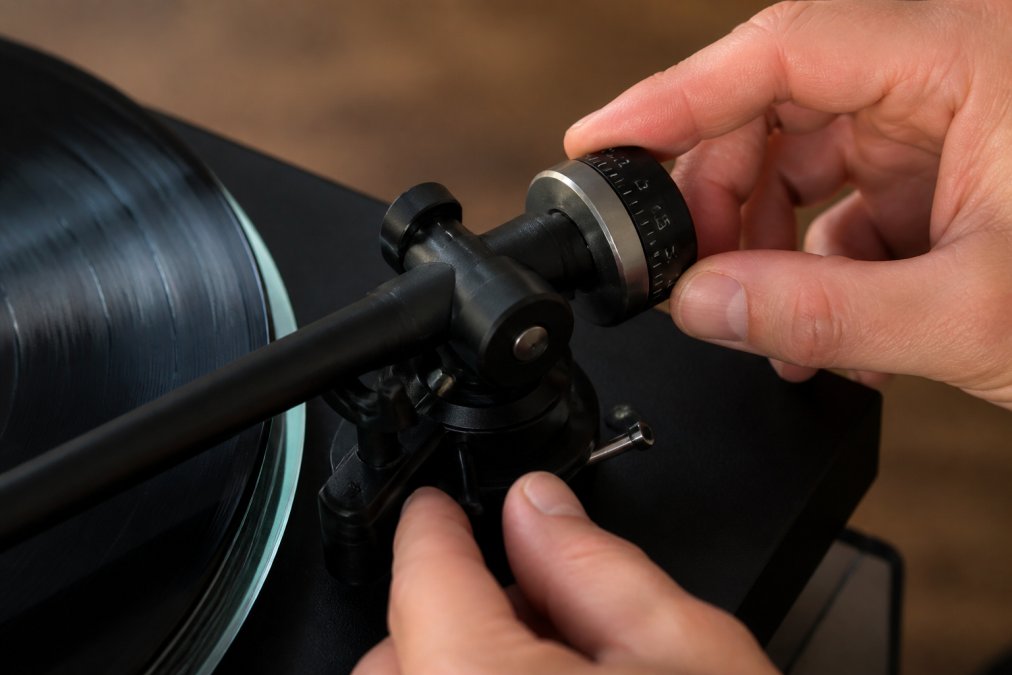
Gently lift the tonearm level with the record surface and slowly move the counterweight forward along the wand. Find the point where the tonearm floats, where it neither rises nor falls.
When you find that sweet spot, the tonearm feels weightless, it won't pull down or lift up. This is zero-balance. Note the number on the counterweight if it has markings.
The counterweight dial shows reference points, not tracking force yet. Write down the zero-balance number for your next step.
If you're struggling, move the counterweight very slowly, small adjustments make a big difference. Be patient; this gets easier with practice.
How to Use a Stylus Force Gauge for Accurate Tracking Force
Now that your tonearm is balanced, you need to set the correct tracking force. This is where a stylus force gauge becomes invaluable, and understanding how to use it properly separates a correct setup from a guessed one.
Understanding Your Gauge Type
Two main gauge types exist: dial-type (mechanical) and digital (electronic). Each works differently and requires slightly different technique.
Dial gauges use a spring-loaded platform showing force on a dial. They're affordable and battery-free but prone to calibration drift and parallax error. Always read straight on, perpendicular to the face.
Digital gauges use a load cell sensor and LCD display. They're more accurate, repeatable, and immune to parallax error, though they require batteries and occasional recalibration. Digital gauges are the standard among experienced turntable owners.
Setting Up Your Gauge Correctly
Place the gauge on the platter roughly 10-15 cm from the centre spindle, where you'd normally play music. Always use the same spot for consistency, as tracking force varies slightly across the platter radius.
Lower the tonearm slowly and deliberately, don't drop it. Gentle contact prevents stylus damage and false readings from impact shock.
Wait 2-3 seconds after the stylus settles to ensure a stable reading, not a transient spike.
Reading and Interpreting the Measurement
Most cartridges require between 1.5 and 2.5 grams of tracking force. Check your cartridge's manual for the exact specification, this is non-negotiable. Some cartridges are sensitive to force and specify a narrow range (e.g., 1.8-2.0g); others allow a wider window.
If the gauge reads too high, move the counterweight backward in small increments (a quarter turn typically changes the reading by 0.1-0.2g). If too low, move it forward.
Make one adjustment, lift the tonearm, and measure again. This iterative approach is more reliable than trying to dial in the exact force in one go.
Why Dial Readings Often Mislead Beginners
Many turntables have a dial-type gauge built into the counterweight, but these are notoriously inaccurate. A built-in dial might read 2.0g when a standalone gauge shows 2.3g. This discrepancy causes your stylus to dig too deep (wearing records and stylus faster) or sit too shallow (causing skipping and distortion).
External gauges, especially digital ones, eliminate guesswork and ensure your setup is genuinely correct.
Recording Your Baseline
Once you've set your tracking force accurately, write down the counterweight position and gauge reading. Keep this with your turntable manual as a reliable baseline.
Check your tracking force every 3-6 months during the first year; components settle over time. After the first year, annual checks are usually sufficient.
Anti-Skate Adjustment for Beginners
Anti-skate counteracts the tonearm's tendency to pull inward toward the centre. Without it, the stylus digs harder into the groove's inner wall, causing uneven wear and distortion.
Most turntables have an anti-skate dial near the tonearm base, numbered to match your tracking force. If you've set tracking force to 2 grams, set anti-skate to 2.
Set anti-skate equal to your tracking force first, then listen carefully. If the sound is clear and detailed, you're good. If you hear distortion on one channel, adjust slightly.
The anti-skate adjustment is subtle, but over time, proper anti-skate reduces stylus wear and extends record life significantly.
Turntable Tracking Force Settings and Cartridge Compliance
What Cartridge Compliance Means
Compliance measures how much the cartridge's internal suspension compresses under pressure (expressed in µm/mN). High-compliance cartridges have soft, flexible suspensions; low-compliance cartridges have stiff ones.
Compliance interacts with tracking force. High-compliance cartridges (15 µm/mN or higher) need lighter force (1.25-1.75g); too much force bottoms out the suspension, creating distortion. Low-compliance cartridges (8 µm/mN or lower) need heavier force (2.0-3.0g) to track without skipping.
Most moving-magnet cartridges need 1.5-2.5g; moving-coil cartridges often need 1.8-2.5g or higher. Always check your cartridge's manual for compliance rating and recommended tracking force range.
How Tonearm Mechanism Affects Your Setup
Screw-on counterweights thread onto the tonearm wand like a large nut. They're straightforward but less precise, each full rotation might change tracking force by 0.5g or more, making fine adjustments difficult.
Sliding counterweights slide along a smooth shaft and allow finer adjustments, moving the weight 1 cm might change tracking force by only 0.1g. This precision makes hitting your target force much easier, especially for cartridges with narrow force windows.
Spring-loaded counterweights use an internal spring mechanism and decouple counterweight position from actual tracking force. You typically set a dial to your desired force. Follow the manufacturer's instructions carefully, the balancing process differs from screw-on or sliding weights.
Check your turntable's manual to identify which type you have. This determines how much patience you'll need during the adjustment phase.
Matching Cartridge to Tonearm Geometry
Beyond compliance, your tonearm's effective mass (how heavy the tonearm assembly is) affects tracking force stability. A heavier tonearm naturally applies more downforce at a given counterweight position. A lighter tonearm applies less. This is why two identical cartridges on different turntables might need slightly different counterweight positions to achieve the same tracking force.
This is another reason to use an external stylus force gauge rather than relying on the counterweight dial alone. The gauge accounts for your specific tonearm's geometry and mass automatically.
Upgrading Your Cartridge Later
If you upgrade your cartridge in future, you'll need to rebalance your tonearm and reset your tracking force. The process is identical to what you've done now, but your counterweight position will likely be different. A lighter cartridge might require the weight further back; a heavier one might need it further forward.
Compliance and Record Longevity
Common Mistakes to Avoid When Balancing Your Tonearm
Most beginners make the same errors. Knowing what to avoid saves time and protects your equipment.
Frequently Asked Questions
How can I tell if my tonearm is balanced correctly?
A properly balanced tonearm floats horizontally when the counterweight is adjusted to the zero-balance point. The tonearm should neither dip toward the record nor lift away. You'll also notice improved playback quality: less groove distortion, reduced record wear, and clearer treble. If the stylus digs into the groove or skips, your balance needs adjustment.
Do I need a stylus force gauge to balance my tonearm?
A stylus force gauge is highly recommended for accurate results. While some turntables have tracking force dials, these can drift over time and aren't always precise. A digital stylus force gauge removes guesswork and ensures you're applying the correct downforce for your cartridge's specifications, typically between 1.5 and 2.5 grams depending on your model.
What is the correct tracking force for my turntable?
Tracking force depends on your specific cartridge and is usually found in its documentation. Most modern moving magnet cartridges require 1.5 to 2.0 grams of tracking force, while moving coil cartridges often need 2.0 to 2.5 grams. Always check your cartridge manufacturer's recommendation. Too much force damages records and the stylus; too little causes skipping and poor sound.
Why is anti-skate adjustment important?
Anti-skate counteracts the tonearm's natural inward pull toward the record's centre. Without proper anti-skate adjustment, the stylus presses harder on the inner groove wall, causing uneven wear and distortion. Set anti-skate to match your tracking force for balanced playback across both stereo channels and to protect your records from premature wear.